shopping_bag

CART

0

forum
arrow_right_alt

YOUR CART

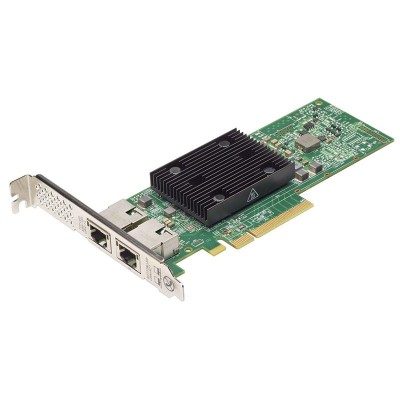
Dell Broadcom 57416 3TM39 Dual Port PCIe Adapter Network Interface Card for R550 R740 R750 R750XS R940

Brand:
Status: Call for Price

Main Features

Show More
remove add
  • Specification
  • Description
  • Reviews

Description

The Broadcom 57416 Dual Port 10GbE BASE-T Adapter is a high-performance network interface card designed to deliver reliable and fast connectivity for enterprise servers and data centers. With dual RJ-45 ports supporting 10 Gigabit Ethernet speeds, it provides flexible and scalable network performance while maintaining backward compatibility with 1GbE and 100MbE connections.

Built on PCIe 3.0 x8 interface, the 57416 ensures high bandwidth and low latency, making it ideal for demanding workloads such as virtualization, cloud infrastructure, high-performance computing, and storage networking. It comes with advanced offload technologies like TCP/IP Offload, RDMA over Converged Ethernet (RoCE), iSCSI, and FCoE support, reducing CPU overhead and improving system efficiency.

Virtualization environments benefit greatly from its SR-IOV, VMware NetQueue, and Microsoft VMQ support, allowing multiple virtual machines to access the network seamlessly with improved throughput. The adapter is also compatible with major operating systems, including Windows Server, Linux distributions, and VMware ESXi.

The Broadcom 57416 provides enterprise-class reliability with features like PXE Boot, Wake-on-LAN, and robust error handling. Supporting Cat6A cabling up to 100 meters, it ensures flexible deployment in modern infrastructures. Overall, it is a versatile and cost-effective solution for upgrading network speed and efficiency in business-critical applications.

???? Key Features

  • Dual-Port 10GbE Connectivity – Provides two independent 10 Gigabit Ethernet BASE-T ports for high-speed data transfer.
  • Interface – PCI Express 3.0 x8 interface ensures maximum throughput.
  • RJ-45 Support – Standard copper cabling (Cat6a/Cat7) up to 100 meters for cost-effective deployment.
  • Virtualization Support – Compatible with VMware, Microsoft Hyper-V, and Linux KVM for efficient VM networking.
  • Advanced Networking Features – Includes VXLAN, NVGRE, RoCE, iSCSI offloads, and SR-IOV for data center optimization.
  • Reliability – Features load balancing, failover, and link aggregation for higher availability.
  • Energy Efficient – Supports Energy Efficient Ethernet (EEE) to reduce power consumption.

???? Where It Can Be Used?

  • Enterprise Servers & Data Centers – For high-performance networking in rack servers.
  • Cloud Infrastructure – Enhances bandwidth for virtualization and containerized environments.
  • High-Speed Storage Access – Used in SAN and NAS environments to accelerate iSCSI or storage traffic.
  • Campus Networks – Ideal for backbone or aggregation points requiring 10G speed.
  • High-Traffic Applications – Supports workloads like database servers, HPC, and video streaming.

⚙️ Installation Step

  1. Power Off Server – Shut down the system and disconnect power.
  2. Insert Adapter – Install the Broadcom 57416 card into an available PCIe 3.0 x8 slot.
  3. Connect Cables – Attach Cat6a/Cat7 Ethernet cables to the RJ-45 ports.
  4. Power On Server – Boot the system and enter the operating system
  5. Driver Installation – Install the latest Broadcom NetXtreme drivers from Broadcom/Dell/HPE support site.
  6. Configure Network – Assign IP addresses, VLANs, or enable teaming as required.
  7. Verify Operation – Test network connectivity and ensure both ports are active.

Reviews (0) :

Get specific details about this product from customers who own it.

Write your review

 Bad           Good

Description

The Broadcom 57416 Dual Port 10GbE BASE-T Adapter is a high-performance network interface card designed to deliver reliable and fast connectivity for enterprise servers and data centers. With dual RJ-45 ports supporting 10 Gigabit Ethernet speeds, it provides flexible and scalable network performance while maintaining backward compatibility with 1GbE and 100MbE connections.

Built on PCIe 3.0 x8 interface, the 57416 ensures high bandwidth and low latency, making it ideal for demanding workloads such as virtualization, cloud infrastructure, high-performance computing, and storage networking. It comes with advanced offload technologies like TCP/IP Offload, RDMA over Converged Ethernet (RoCE), iSCSI, and FCoE support, reducing CPU overhead and improving system efficiency.

Virtualization environments benefit greatly from its SR-IOV, VMware NetQueue, and Microsoft VMQ support, allowing multiple virtual machines to access the network seamlessly with improved throughput. The adapter is also compatible with major operating systems, including Windows Server, Linux distributions, and VMware ESXi.

The Broadcom 57416 provides enterprise-class reliability with features like PXE Boot, Wake-on-LAN, and robust error handling. Supporting Cat6A cabling up to 100 meters, it ensures flexible deployment in modern infrastructures. Overall, it is a versatile and cost-effective solution for upgrading network speed and efficiency in business-critical applications.

???? Key Features

  • Dual-Port 10GbE Connectivity – Provides two independent 10 Gigabit Ethernet BASE-T ports for high-speed data transfer.
  • Interface – PCI Express 3.0 x8 interface ensures maximum throughput.
  • RJ-45 Support – Standard copper cabling (Cat6a/Cat7) up to 100 meters for cost-effective deployment.
  • Virtualization Support – Compatible with VMware, Microsoft Hyper-V, and Linux KVM for efficient VM networking.
  • Advanced Networking Features – Includes VXLAN, NVGRE, RoCE, iSCSI offloads, and SR-IOV for data center optimization.
  • Reliability – Features load balancing, failover, and link aggregation for higher availability.
  • Energy Efficient – Supports Energy Efficient Ethernet (EEE) to reduce power consumption.

???? Where It Can Be Used?

  • Enterprise Servers & Data Centers – For high-performance networking in rack servers.
  • Cloud Infrastructure – Enhances bandwidth for virtualization and containerized environments.
  • High-Speed Storage Access – Used in SAN and NAS environments to accelerate iSCSI or storage traffic.
  • Campus Networks – Ideal for backbone or aggregation points requiring 10G speed.
  • High-Traffic Applications – Supports workloads like database servers, HPC, and video streaming.

⚙️ Installation Step

  1. Power Off Server – Shut down the system and disconnect power.
  2. Insert Adapter – Install the Broadcom 57416 card into an available PCIe 3.0 x8 slot.
  3. Connect Cables – Attach Cat6a/Cat7 Ethernet cables to the RJ-45 ports.
  4. Power On Server – Boot the system and enter the operating system
  5. Driver Installation – Install the latest Broadcom NetXtreme drivers from Broadcom/Dell/HPE support site.
  6. Configure Network – Assign IP addresses, VLANs, or enable teaming as required.
  7. Verify Operation – Test network connectivity and ensure both ports are active.

Reviews (0) :

Get specific details about this product from customers who own it.

Write your review

 Bad           Good